 Hop Hop Hop AI
Guide
How to film Hop Hop Hop with a friend (no AI needed)
Updated November 1, 2026
Film one person close to a stationary phone and the other farther away. Align the near person’s palm above the distant person’s head, time a crouch to the hand moving down, then swap positions for a second take. A hard cut joins the two halves. The size illusion comes from perspective, so you do not need an AI effect or a shrinking filter.
This is a practical breakdown of the Nirami and Cole hallway reference, with setup suggestions for recreating it. The frames below come from that creator clip, not from a shoot or generated result by us.
Before recording: choose the sound and clear the frame
You need two people, a phone held upright on a stable support, and a clear space with enough depth to separate the performers. A hallway makes the distance obvious, but any uncluttered location with room for small hops and a crouch can work. Keep the floor clear and use an imaginary squash, with no physical contact.
Choose the audio excerpt first and use the same playback for both takes. The reference uses Shluzov’s Её парень; our song and source guide links the exact TikTok sound page. Practice to that excerpt because other uploads may start at a different point or use a different speed.
1. Lock the camera and mark two positions
Start with the phone’s normal 1× camera in vertical framing. Put the near performer to one side of the image and the far performer on the opposite side. In the reference, the near person is on the right and the distant person on the left. Leave the distant person’s feet and space above their head visible.
Move the distant performer farther away until they look small enough for the palm trick. There is no universal distance: lens, room size and height all change the result. Record a short test rather than committing to a measured distance.
Mark both standing positions with tape. Once the framing works, keep the phone, zoom and angle unchanged for both takes. If your camera app supports focus and exposure lock, use it to reduce refocusing or brightness changes when the near performer moves.
2. Line up the palm through the camera
The near performer holds a flat palm above the distant person’s head in the phone image. Check the screen or a test recording; the alignment can look wrong from beside the phone even when it looks right through the lens.
Move the hand sideways until it covers the head’s horizontal position, then lower it to just above the head in the frame. Keep the arm ready in that plane. The distant person should hop mostly in place, not toward the lens, or their apparent size and alignment will change.

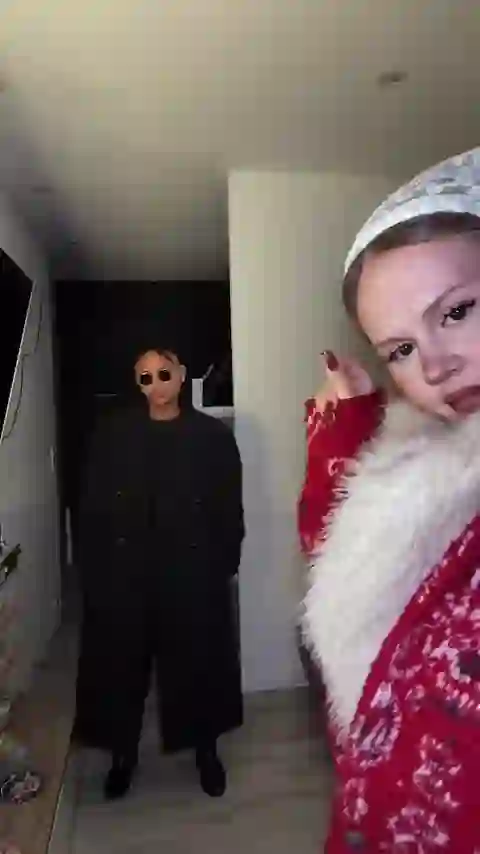
Reference frames: @nirami1 with @colehairlesscat. Timestamps refer to the clip shown on this site.
3. Record the first half: point, hop, squash
- Point: the near performer introduces the distant partner with a pointing gesture.
- Hop three times: the distant performer makes three small hops to the chosen audio while staying on their mark.
- Squash: the near performer lowers the flat palm as the distant partner bends their knees and crouches. Coordinate the start and finish of those movements.
Keep recording briefly after the crouch so you have room to choose the cut. Review the take before swapping: a hand that travels down while the partner stays upright reads as a wave, not a squash.
4. Swap performers, not the camera
Trade the two marked positions. The former distant performer is now near the lens, and vice versa. Recheck palm alignment because different heights and arm lengths change where the hand should sit. Keep the background and framing consistent.
Record the second half to the same audio cue. You can record the complete sequence again and use only the section you need. Allow a little extra footage at each end rather than trying to stop recording exactly on the beat.
5. Join the takes with a hard cut
In an editor with a trim tool, place the first take before the second. End the first half after the squash and start the second with the roles reversed. Use a straight cut: a dissolve shows both bodies at once and weakens the sudden reversal.
The cut in our hallway reference is around 4.3 seconds into an approximately 8.2-second clip. That is a reference point for this footage, not a required setting for every sound edit. Choose the cut against your own audio and movement.
Keep one continuous copy of your chosen soundtrack across the edit so the cut does not repeat or skip the beat. If adding the sound in the posting app, turn down the recorded rehearsal audio to avoid an echo, then check sync before publishing.
If the illusion is not working
- The hand misses the head: pause at the start of the squash and adjust the palm from the camera’s view. Do not fix alignment by moving the phone between takes.
- The far person is too large: increase the separation and reframe before recording both halves. Keep their whole body visible.
- The hop moves them out of place: make the jumps smaller and use the floor mark as a landing target.
- The squash feels disconnected: rehearse the palm descent and crouch together without the hops, then add the full sequence.
- The swap looks like a camera jump: compare the background edges on either side of the cut. Restore the same camera position, zoom and crop.
For a final check, watch once muted to judge the perspective and cut, then again with sound to judge the beat. Both performers should get a clear turn as the “large” and “small” person.
Want the music credits or the creator links before posting your version? Read the original clip, song and meme source guide.